

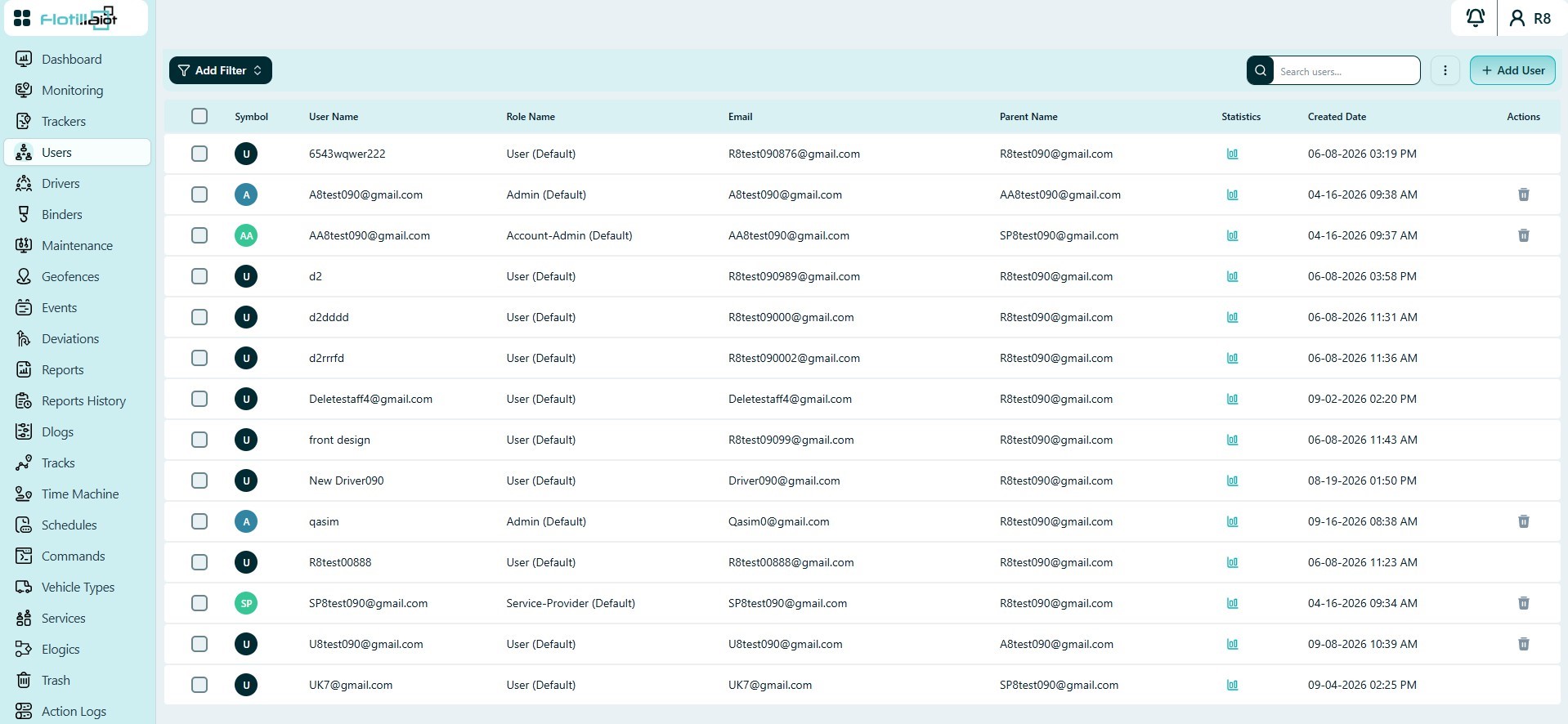
The Users module is where you create and manage platform users, their roles and the resources they can access.
- The list shows each user’s symbol, user name, role, email, parent account, statistics and created date.
- Filters and search help you find users quickly, and the actions column edits or removes a user.
5.1 Adding and Managing Users
- Click + Add User and enter the name, email, password and role.
- Grant the user access to the specific trackers and modules they need. This limits what they can view and manage.
- To change or remove a user later, find them with the filters or search and use the actions column.
NOTE User activity such as logins is recorded in Action Logs (Chapter 23), including which user performed each action.
5.2 Roles and Access
Every user has a role, shown in the user list, and access rights to specific trackers and modules. A user can only see and manage what their role and access rights allow. The list also shows the parent account of each user.
- To control which platform users can view or manage a unit, use the unit’s Access tab (Trackers → Unit Settings → Access, Chapter 4).
- Review who changed what, and when, in Action Logs (Chapter 23).