


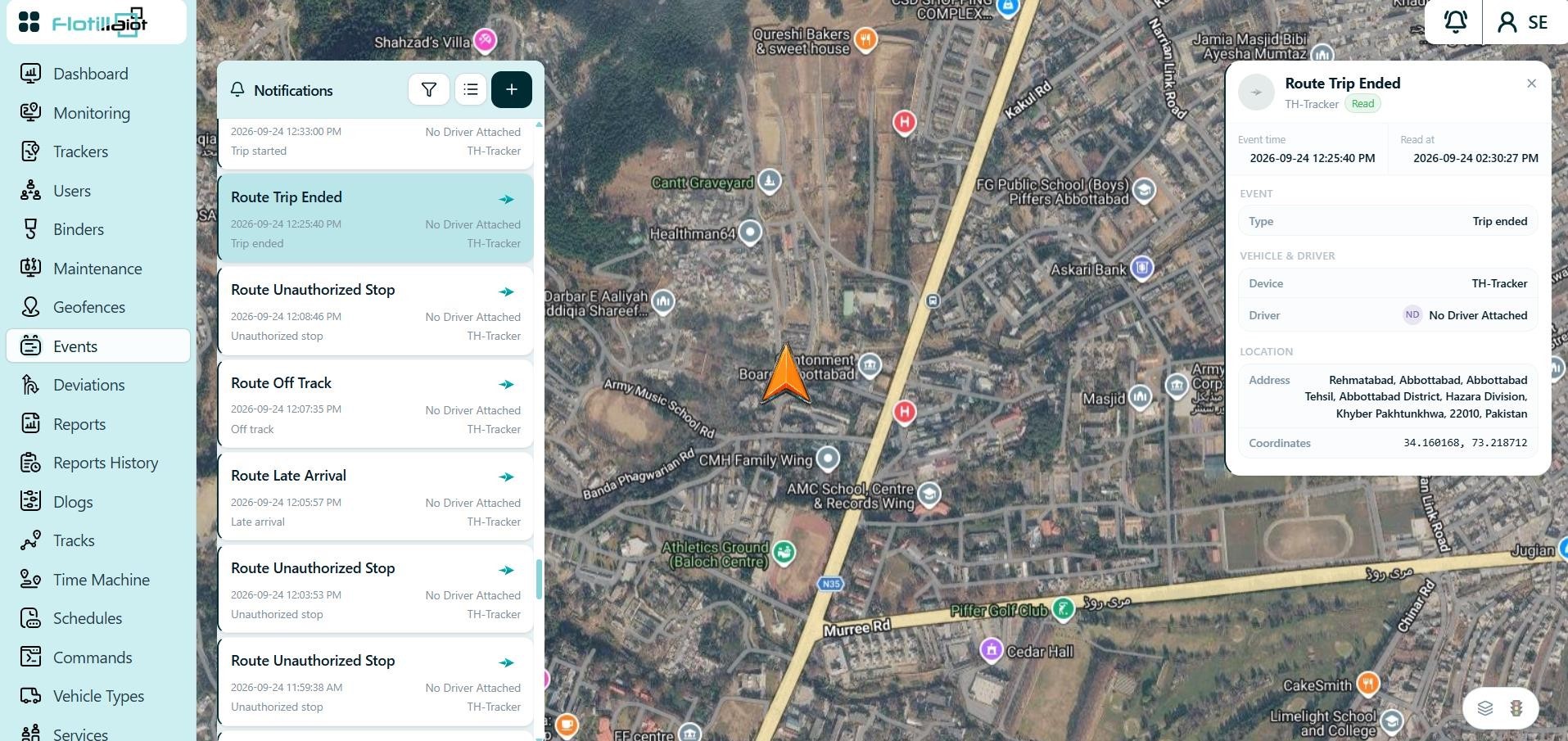
The Events module manages the notifications triggered by fleet activity and device data. Alerts appear in the notifications panel over the live map and can also be delivered through other configured channels.
- The notifications panel lists each alert with its type, time and the unit that generated it (for example Queued Command Sent).
- Typical rules cover geofence entry and exit, speeding, ignition, motion states, sensor thresholds and device connectivity.
10.1 Working with Notifications
- Click the + button to create a notification rule, for example for geofence entry or exit, speeding, ignition, motion states, sensor thresholds or device connectivity.
- Assign units to the rule from Trackers → Unit Settings → Notification.
- Use the filter and list view to narrow the alerts and browse the notification history.
NOTE Route deviation events from the Deviations module also appear in the notifications panel, and today’s alert totals are shown in the Total Alerts widget on the Dashboard.
10.2 Notification Delivery and Rule Settings
Alerts always appear in the notifications panel, which you open with the bell icon at the top right. Depending on the rule, they can also be delivered through other channels. Deviation alerts, for example, can be delivered as a web pop-up, a mobile notification, an email or an SMS (Chapter 11).