


The Trackers module lists the tracking units registered on the platform and lets you add, import and export them. In the FMS platform each customer works with their own trackers; here you see the bigger picture.
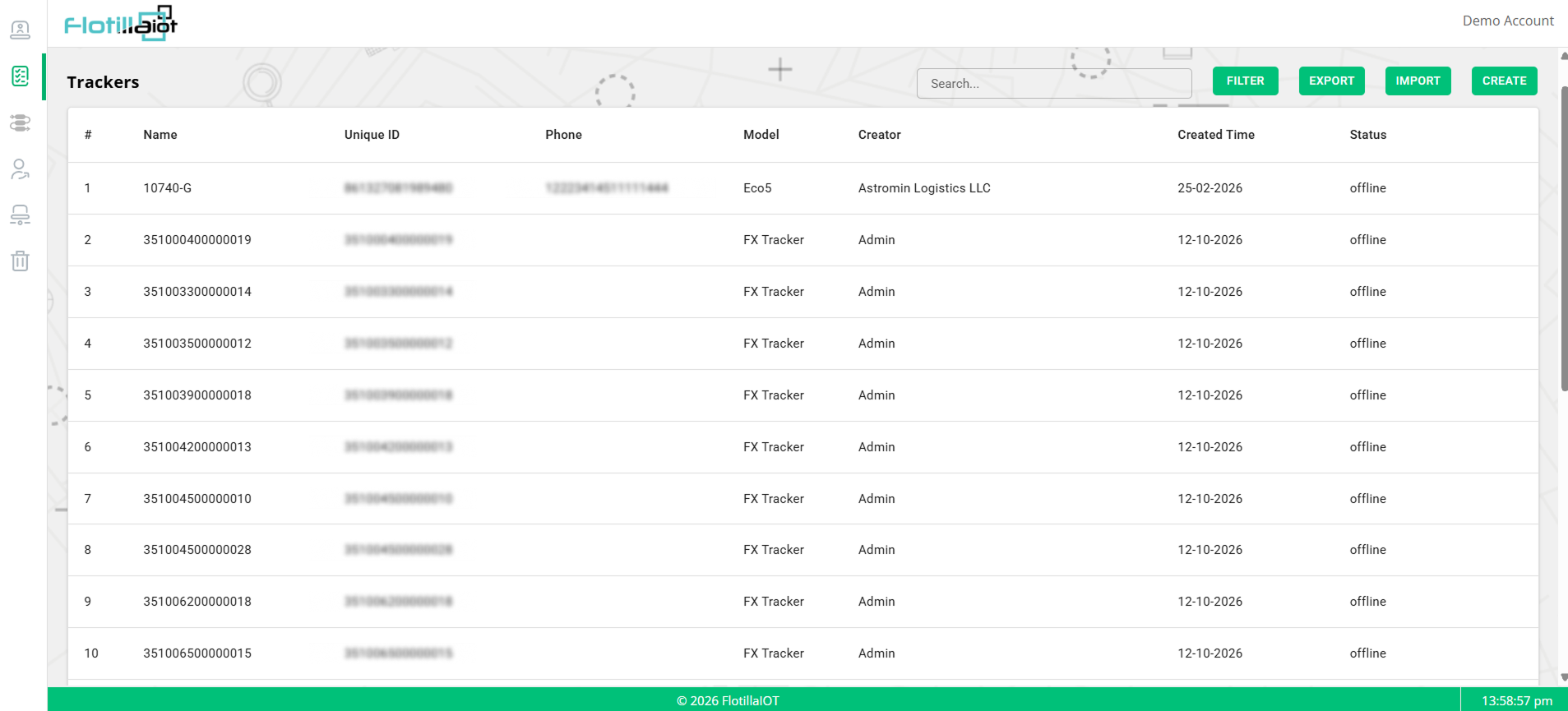
3.1 Reading the Tracker List
| Column | What it shows |
|---|---|
| # | The row numbers. |
| Name | The name of the tracker. It is often the device identifier until a name is set. |
| Unique ID | The unique identifier of the device, such as its IMEI. |
| Phone | The phone number of the device, when one has been entered. It can be empty. |
| Model | The device model, for example Eco5 or FX Tracker. |
| Creator | The account or user that created the tracker, for example Admin or a customer account. |
| Created Time | The date on which the tracker was added. |
| Status | The communication state of the tracker, for example offline. |
3.2 Toolbar Controls
| Control | What it does |
|---|---|
| Search | Find a tracker by name, unique ID, model or creator. |
| FILTER | Opens filter options to limit the list. |
| EXPORT | Exports the tracker list for use outside the platform. |
| IMPORT | Adds several trackers in one step instead of one at a time. |
| CREATE | Opens the form to register a single new tracker. |
3.3 Registering a Tracker
- Click CREATE in the Trackers list.
- Enter the tracker name and its unique ID (IMEI), and the phone number if you have it.
- Select the device Model.
- Save the tracker. It appears in the list with the status offline until it sends its first data.
3.4 Importing Trackers
When you have many trackers to add, for example for a new customer, use IMPORT to bring them in together.
- Prepare the list of trackers with their names, unique IDs and models.
- Click IMPORT and follow the prompts to load the list.
- Check the new rows in the Trackers list, using Search or FILTER.
NOTE A tracker that stays offline after installation usually has a wrong unique ID, a wrong model or a device that is not yet sending data to the server.
NOTE Who may create, update or delete trackers is controlled by the Tracker permissions of each role (Chapter 5). Detailed unit configuration is done in the FMS platform (FMS manual, Chapter 4).