


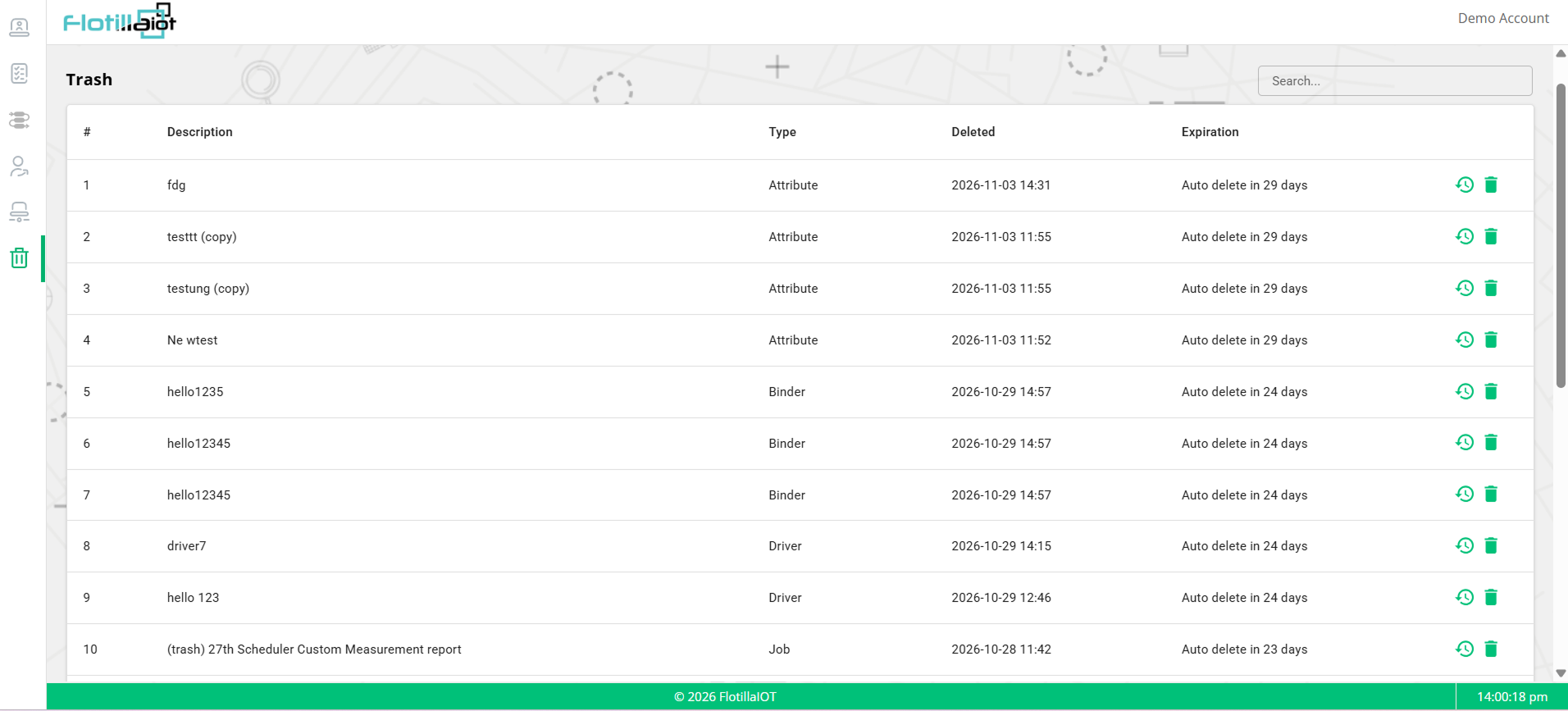
The Trash module manages deleted records. Items that are deleted in the platform are kept here for a limited time, so that you can restore them if the deletion was a mistake.
IMPORTANT Items in Trash are deleted automatically when the countdown in the Expiration column ends, which is 30 days after deletion. Deleted data cannot be recovered. Restore important items as soon as possible.
7.1 Reading the Trash List
| Column | What it shows |
|---|---|
| # | The row numbers. |
| Description | The name of the deleted item. |
| Type | The kind of item, for example Attribute, Binder, Driver or Job. |
| Deleted | The date and time of the deletion. |
| Expiration | The time left before the item is removed for good, for example Auto delete in 29 days. |
| Row actions | The restore icon (a clock with an arrow) puts the item back. The trash icon removes it right away. |
7.2 Restoring a Deleted Item
- Use Search to find the item by its description.
- Check its Type, the Deleted time and the Expiration.
- Click the restore icon at the end of the row. The item is put back where it was.
7.3 Removing an Item for Good
To remove an item before its countdown ends, click the trash icon at the end of its row. Do this only when you are sure that the item is no longer needed, because it cannot be recovered afterwards.