


In the Basic option, users can update or set the information about the units.
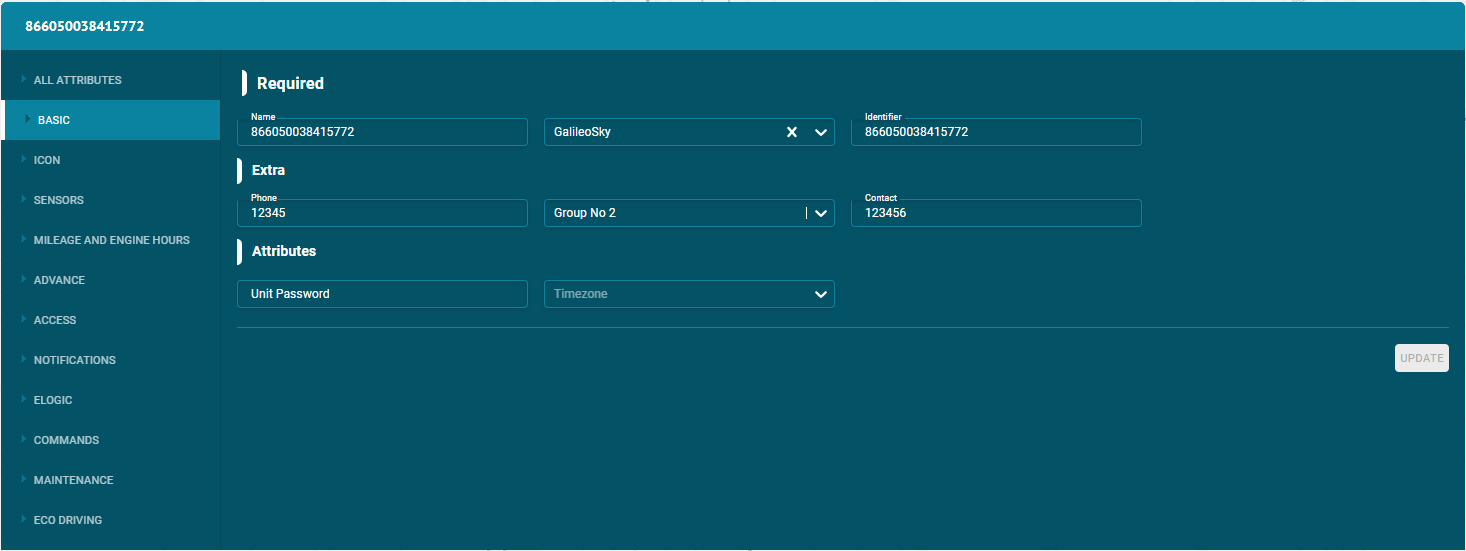
Following are the information types that can be set or updated:
Required
- Name
Set the specific name of the unit. By this name, the unit is shown on the map, in the unit list and some other component.
- Device Model:
Select the model of the tracking device connected to the unit.
- Identifier
Set the unique identification code (ID) for the unit required to identify it by the system.
Attributes
- Unit password
Set the specific password of the unit. Set the specific password of the unit.
- Time Zone
Set the time Zone of the unit i.e. Asia/Dubai etc.
- Install Date
Enter the install date of the unit here.
- Expire Date
Enter the expiry date of the unit here.
- Tags
You can enter different tags for the units to add more information.
Extra
- Phone number
Set the phone number of the unit. The phone number should be in the international format.
- Model
Set the model number of the unit.
- Contact
Set the contact number of the unit. The contact number should be in the international format.