




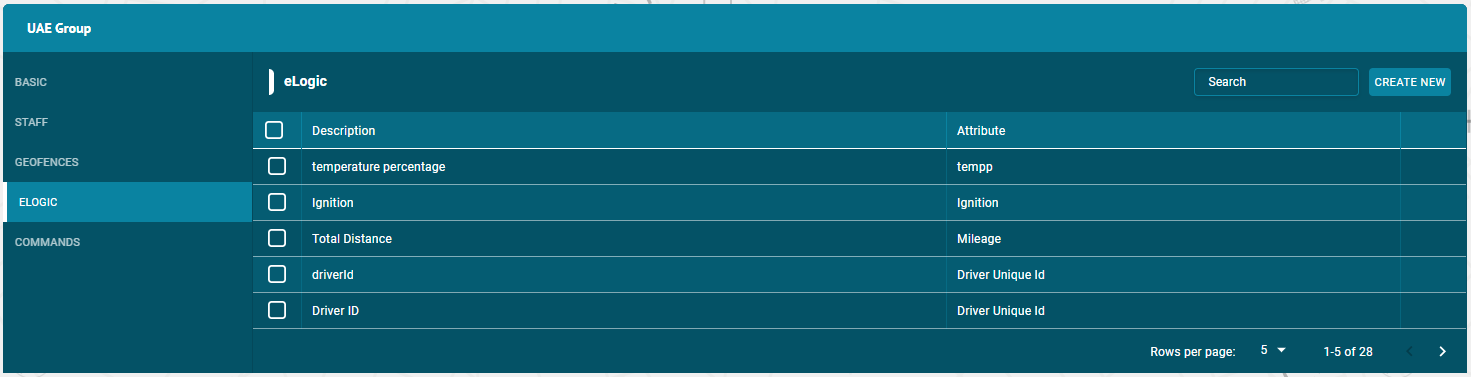
On the ELOGICs tab of the Group options, users can create, edit, delete or view ELOGICs and can assign ELOGICs to the groups.
In the flotilla IOT, ELOGICs can be of any names. Some names are predefined in the device configuration. ELOGICs is a required sensor property. Most of the sensors are based on the ELOGIC configuration setting of the device. ELOGIC can also be used to create sensors. To work with the ELOGICs, choose the ELOGICs tab in the Units component. User need to have access right to create, edit, assign and delete ELOGICs. Otherwise, user can only view existing ELOGICs.
Create ELOGIC
To create an ELOGIC:
- Click on the Create new button
- Enter description of the ELOGIC
- Enter attributes of the ELOGIC
- Enter the ELOGIC/input value
- Enter Type (String, Number, Boolean)
- Click on Add button.
Assign ELOGIC
- To assign ELOGICs to the groups — Click on the group and then ELOGICs tab.
- Click on the check boxes of the ELOGICs to assign this group.
- The ELOGICs with the right tick in the check boxes are those who already have some access to this group.
- The ELOGICs with the empty check boxes are those who doesn’t have access to this group.
Search ELOGIC
- To find the required ELOGIC in the ELOGICs list, use the search field above ELOGICs list.
- Enter the required ELOGIC name in search field, the result will display.
Delete ELOGIC
- To delete an ELOGIC:
- Select the ELOGIC on the ELOGICs list and click on Delete icon next to ELOGIC name in the ELOGICs list
- The ELOGIC will be deleted successfully and will not be displayed in the ELOGICs list.
Update ELOGIC
To update an ELOGIC:
- Select the ELOGIC on the ELOGICs list and click on Edit icon next to ELOGIC name in the ELOGICs list
- Update the ELOGIC information that user wants to update and then click on update button.
- The ELOGIC information will be updated successfully.